← FlexAPI Documentation / Reference / Coordinate-Based Tagging
Coordinate-based tagging (fixed positioning) places signatures, initials, dates and other fields at an exact position on a given page. Use it when your documents are static and the layout never moves. If your content is dynamic, consider text tagging instead. To compare all approaches, see Choosing a tagging approach on the SubmitDocument page.
SignatureLine or text tags on the same Form.FixedPositioningField must come before any FixedPositioningSignature.Type, not FieldType. Field values: TextField, Checkbox, DateSigned, NotarySeal, endorsementinfo. Signature values: signature, initial.MemberInfoNumber goes only on signatures. On a field it is a schema error.TagName and reference it from the signature with DateSignedTagName or NotarySealTagName.Positions are measured from the upper-left corner of the page, which is (0,0). X increases to the right and Y increases downward. XPosition and YPosition locate the lower-left corner of the field box, and Width and Height extend from there. All values are in 1/72 inch points, so a US Letter page is about 612 x 792.
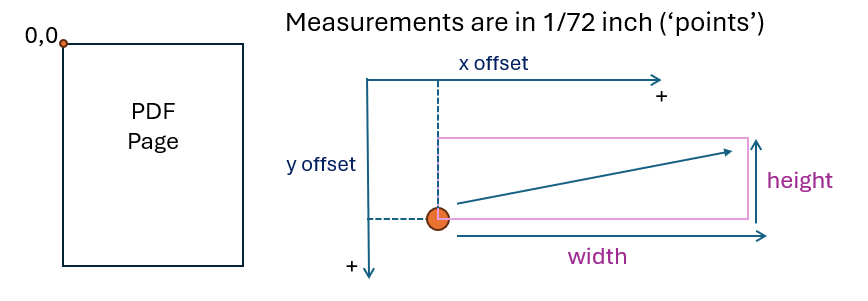
Non-signature fields use FixedPositioningField. Since Release 181, TagName sets the PDF field name for these fields. For signatures and initials the PDF field name is generated automatically.
<FixedPositioningField> <!-- Repeat once for each field. -->

  <!-- Mandatory. TextField, Checkbox, DateSigned, NotarySeal or endorsementinfo (printed name
       and 21 CFR Part 11 reason fields). The element is Type, not FieldType. -->
  <Type>DateSigned</Type>

  <!-- Mandatory. Page number, starting at 1. -->
  <Page>1</Page>

  <!-- Mandatory. Lower-left corner of the box, in 1/72 inch from the upper-left of the page. -->
  <XPosition>150</XPosition>
  <YPosition>500</YPosition>

  <!-- Mandatory. Large enough to display the content. The whole box must fit on the page. -->
  <Width>120</Width>
  <Height>30</Height>

  <!-- Mandatory. yes if the signer must complete the field. -->
  <IsRequired>yes</IsRequired>

  <!-- Mandatory. Unique name. Sets the PDF field name and can be referenced by signatures. -->
  <TagName>DateField1</TagName>

</FixedPositioningField>A FixedPositioningSignature places a signature or initials for one signer. Set Type to signature or initial. Optional elements link other items: DateSignedTagName (a date field declared earlier), DateSignedFormat, EditableFieldTagName (repeatable), PrintedNameTagName and NotarySealTagName. NotarySealTagName is mandatory in a notarial transaction.
<FixedPositioningSignature> <!-- Repeat once for each signature or initial. -->

  <!-- Mandatory. Signer, matching the MemberInfo order in the request. -->
  <MemberInfoNumber>1</MemberInfoNumber>

  <!-- Mandatory. signature or initial. -->
  <Type>signature</Type>

  <!-- Mandatory. Page and lower-left position of the box. -->
  <Page>1</Page>
  <XPosition>150</XPosition>
  <YPosition>540</YPosition>

  <!-- Mandatory. Size of the box. -->
  <Width>144</Width>
  <Height>36</Height>

  <!-- Mandatory. -->
  <IsRequired>yes</IsRequired>

  <!-- Optional. Date field declared earlier, and its format. -->
  <DateSignedTagName>DateField1</DateSignedTagName>
  <DateSignedFormat>MM/dd/yy</DateSignedFormat>

  <!-- Optional. NotarySealTagName is mandatory in a notarial transaction. -->
  <!-- <EditableFieldTagName>EditableField1</EditableFieldTagName> -->
  <!-- <PrintedNameTagName>PrintedName1</PrintedNameTagName> -->
  <!-- <NotarySealTagName>NotarySeal1</NotarySealTagName> -->

</FixedPositioningSignature>Fixed positioning elements are children of the Form element in SubmitDocument. Place them after MimeType (always application/pdf) and before Length and Data. List every FixedPositioningField first, then every FixedPositioningSignature.
<Form>
  <RefID>YOUR_REF_ID</RefID>
  <Desc>YOUR_DOCUMENT_DESCRIPTION</Desc>
  <FileName>YOUR_FILE_NAME.pdf</FileName>
  <MimeType>application/pdf</MimeType>

  <!-- 1. All FixedPositioningField elements first. -->
  <FixedPositioningField> ... </FixedPositioningField>

  <!-- 2. Then all FixedPositioningSignature elements. -->
  <FixedPositioningSignature> ... </FixedPositioningSignature>

  <Length>PDF_BYTE_LENGTH</Length>
  <Data>BASE64_PDF</Data>
</Form>Replace the placeholder values with positions from your own document. Declare date fields and notary seals before the signatures that use them.
<!-- Date field, declared first. -->
<FixedPositioningField>
  <Type>DateSigned</Type>
  <Page>1</Page>
  <XPosition>150</XPosition>
  <YPosition>500</YPosition>
  <Width>120</Width>
  <Height>30</Height>
  <IsRequired>yes</IsRequired>
  <TagName>DateField1</TagName>
</FixedPositioningField>

<!-- Signature for signer 1, picking up the date field above. -->
<FixedPositioningSignature>
  <MemberInfoNumber>1</MemberInfoNumber>
  <Type>signature</Type>
  <Page>1</Page>
  <XPosition>150</XPosition>
  <YPosition>540</YPosition>
  <Width>144</Width>
  <Height>36</Height>
  <IsRequired>yes</IsRequired>
  <DateSignedTagName>DateField1</DateSignedTagName>
  <DateSignedFormat>MM/dd/yy</DateSignedFormat>
</FixedPositioningSignature><FixedPositioningSignature>
<MemberInfoNumber>1</MemberInfoNumber>
<Type>initial</Type>
<Page>1</Page>
<XPosition>500</XPosition>
<YPosition>740</YPosition>
<Width>35</Width>
<Height>30</Height>
<IsRequired>yes</IsRequired>
</FixedPositioningSignature><!-- Notary seal field, declared first. -->
<FixedPositioningField>
<Type>NotarySeal</Type>
<Page>2</Page>
<XPosition>400</XPosition>
<YPosition>600</YPosition>
<Width>100</Width>
<Height>60</Height>
<IsRequired>yes</IsRequired>
<TagName>NotarySeal1</TagName>
</FixedPositioningField>
<!-- Notary signature referencing the seal. NotarySealTagName is mandatory in a notarial transaction. -->
<FixedPositioningSignature>
<MemberInfoNumber>2</MemberInfoNumber>
<Type>signature</Type>
<Page>2</Page>
<XPosition>150</XPosition>
<YPosition>640</YPosition>
<Width>144</Width>
<Height>36</Height>
<IsRequired>yes</IsRequired>
<NotarySealTagName>NotarySeal1</NotarySealTagName>
</FixedPositioningSignature>If a field box extends past the page, SubmitDocument returns an error like this one:
For form #01, FixedPositionField 'DateField1': FixedPositioningField 'DateField1' in Form #01 is out of PDF content area. Please adjust the values in the FixedPositioningField.
Adjust the position, width or height so the whole box falls within the page.
TagName values so linked items are easy to follow.

1110 Market Street, Suite 402
Chattanooga, TN 37402
877.890.5350
info@SIGNiX.com
©2016 SIGNiX. All Rights Reserved.