← FlexAPI Documentation / API Calls / GetAccessLink
GetAccessLink (GAL) returns a single-use URL that takes a user straight into the SIGNiX interface from your own application. Request it for one of two roles. For the submitter, the link opens the MyDoX Wizard, where the submitter can review or edit a transaction, typically one submitted with SuspendOnStart set to yes. No SIGNiX authentication is required, because the user is already signed in to your application. For a signer, the link opens the signing experience after the signer authenticates with the Service chosen in SubmitDocument. By default the link expires after 60 seconds, so redirect or embed it as soon as it is returned. Do not put this default link in an email, because the signer will most likely not click it within that 60-second window. If you want to send your own email to a signer, set GetNormalPickupLink to true on the signer request (see Signer request). The AccessLink element in the response then holds the long-standing pickup link, the same kind SIGNiX emails to signers, and you can put that link in your email. If SIGNiX emails your signers and you only need to follow progress, you don't need GetAccessLink at all. Use it when you want to open or embed SIGNiX inside your own application, or to build your own signer notifications. For examples of how GetAccessLink fits into a complete workflow, see Basic Integration Workflows on the main API page.
Will SIGNiX also email the signer? Usually yes, because SIGNiX sends the normal pickup email when a transaction starts. SIGNiX can suppress transaction emails at the account level, though, so if your own email should be the only one a signer receives, ask SIGNiX to configure that for your account.
For the submitter transaction role, a set of parameters controls which parts of the MyDoX Wizard the submitter may use: AllowTransactionStatusViewing, AllowTransactionContextEditing, AllowDocumentFieldAndTaskEditing, AllowDocumentEditing and AllowParticipantEditing. Each is described in the submitter sample below. AllowTransactionContextEditing, AllowDocumentEditing and AllowParticipantEditing default to false. If none of those three is set to true, the user will not be able to access the MyDoX Transaction Editor.
If even deeper levels of integration are required (for example, integrated application elements controlling aspects of the SIGNiX interface), SIGNiX can share additional information once integration is underway.
Demo here is a schema error.GetNormalPickupLink must come after TransactionRole, not before it.StatusCode is 0 before reading anything, then take the link from AccessLink.GetNormalPickupLink to true. AccessLink then holds the long-standing pickup link, which is safe to email.GetAccessLink requests should always be handled one at a time during a transaction workflow. Because of the temporary nature of the link, plus natural workflow issues, NEVER request multiple signer GAL links at the same time. For example, do not request links for all parties in a transaction at once. Build a step into your own application workflow to ask the submitter which signer should sign, or have the application logic choose the appropriate signer whose link should be requested in real time.
Also, do NOT request a Submitter GAL at the same time as a Signer GAL.
Finally, do not request a Signer GAL for a signer out of order with the transaction workflow, as it cannot be processed. For example, if you have two signers in sequence and Signer One has not completed their tasks, a Signer GAL for Signer Two will not allow Signer Two to access the transaction. Always match the Signer GAL with the expected workflow order and transaction status. The exception is signers who share the SAME workflow order in the SubmitDocument request: they can sign in any order, so a link can be requested for any of them.
IMPORTANT - April 2025: Apple has fundamentally changed how iOS regards third-party cookies with Intelligent Tracking Prevention (ITP). As a result, a SIGNiX interface served through an iFrame on an iOS device will not operate properly on most current iOS devices, regardless of the browser used, because the SIGNiX cookies are regarded as third-party cookies. Unless you know users will not be using an iOS device, or they have all changed the default preference to allow third-party cookies, SIGNiX suggests that you redirect to SIGNiX rather than embed the experience in an iFrame. SIGNiX has explored alternate paths (the Storage Access API), but they require the user to take actions which they may not choose to take, given the poor user experience iOS provides in that circumstance.
SIGNiX signing and Wizard pages are framed only for approved host origins, separately for Webtest and Production. If you plan to embed GetAccessLink (submitter or signer) in an iframe, contact SIGNiX so your host URL or URLs can be added to the allow list for each environment you use. Without it, the browser may block the frame, which looks like a broken embed even though GetAccessLink returned a valid link. Opening the link in a separate window does not need this step.
| Scenario | Embedded | ContainerOrigin | InpersonAuthentication |
|---|---|---|---|
| Open the link in a new window or tab (preferred on iOS) | no, or omit | Your application's origin, if Embedded is sent | Omit or no |
| Embed in an iframe (portal, facilitated signing) | iframe or sameframe | Origin of the page that hosts the frame (scheme, host and port) | Omit or no |
| Kiosk or device-present signing, where your staff or application authenticates the signer instead of SIGNiX | The embed value you use | Host origin | yes |
| In-person facilitation that keeps the Service chosen in SubmitDocument (SMS, SelectOneClick and so on) | sameframe | Host origin | Omit or no |
Setting InpersonAuthentication to yes bypasses the Service chosen in SubmitDocument, so do not layer it on top of a Service you still want the signer to use. Confirm the right embed value for your integration with SIGNiX.
FinishURL or CancelURL points to a page that sends X-Frame-Options: deny. SIGNiX may load those URLs inside the iframe, and the frame then goes blank. For iframe hosts, omit them unless you have validated framed navigation, and advance your own screen when the completion message below arrives.SIGNiX passes a message into the browser when a signer completes their task and reaches the Finish Signing screen:
Signix says: transactionCompleteUse this message to let the application embedding the SIGNiX signing experience know the signer is done, so that it can close the iFrame and move on to the next screen. To handle it safely:
message events on the window, and accept only those whose event.origin matches the origin of the access link URL, so unrelated windows cannot trigger your screen.event.data (a string, or a JSON-serialized object) contains transactionComplete. Ignore case and whitespace.An annotated example of the request XML for a submitter to access elements of the SIGNiX interface follows. SuspendOnStart must be set to yes in the SubmitDocument call if the workflow requires the submitter to edit the transaction immediately before signer interactions. When transactions are created with SuspendOnStart, the normal constraints for a runnable transaction are not checked. The transaction can be an empty shell with no parties or documents, contain partial information that will be filled in later, or be fully populated and ready to run.
TransactionRole. For the submitter, the value is the literal Submitter. Do not use a submitter link to sign as party 1, and do not use a signer link to open the Wizard.
After the submitter saves. When the submitter of a suspended transaction saves in the Wizard, your application typically sends a SubmitAjax Transaction_Resume so the workflow can continue (see the AJAX API). Remote signers then receive the normal pickup email. For in-person signing, request a signer link for each party in turn.
Locking documents (Release 183). SIGNiX allows integrators to lock documents from editing during a GAL-Submitter session. To use this, add <Locked>true</Locked> to the Form section of the document(s) in question in the SubmitDocument request, just before the Length element. When a user then invokes a GAL-Submitter link and accesses the transaction, they see the following dialog:
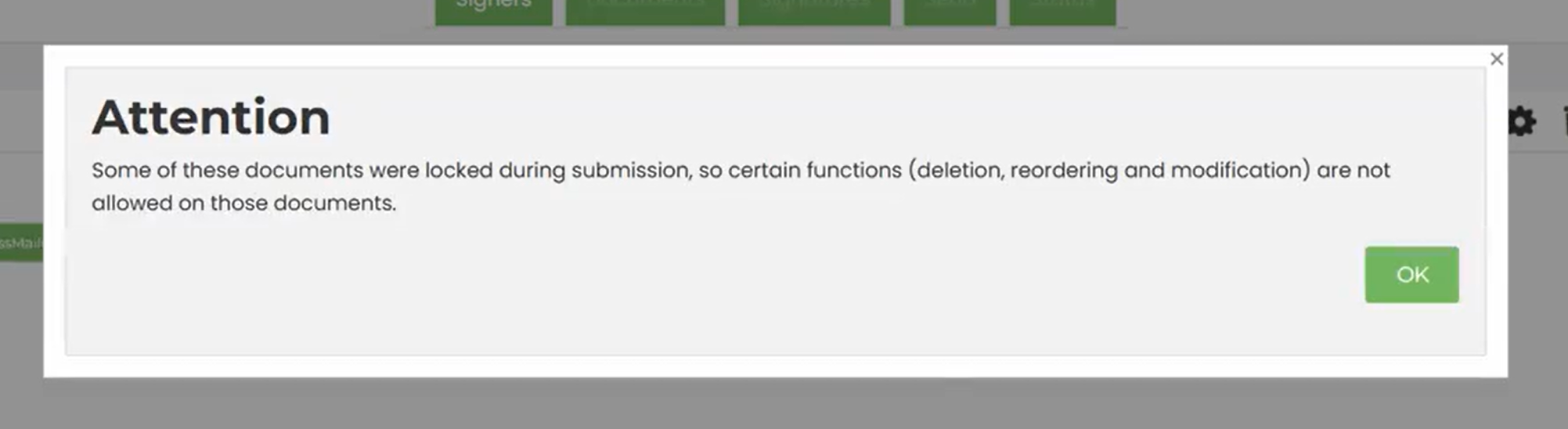
As the message says, locked documents may not be deleted, reordered or modified by the submitter. By default, documents are NOT locked.
<?xml version="1.0" ?>
<GetAccessLinkRq xmlns="urn:com:signix:schema:sdddc-1-1">

  <CustInfo> <!-- Occurs once only -->

    <!-- Assigned by SIGNiX when the Client is set up. All case sensitive. -->
    <Sponsor>YOUR_SPONSOR</Sponsor>
    <Client>YOUR_CLIENT</Client>
    <UserId>YOUR_USER</UserId>
    <Pswd>YOUR_PASSWORD</Pswd>

  </CustInfo>

  <Data> <!-- Occurs once only -->

    <!-- Identifies the transaction: the DocumentSetID returned in the SubmitDocument response. -->
    <DocumentSetID>YOUR_DOCUMENT_SET_ID</DocumentSetID>

    <!-- Required. Indicates for whom the link is intended. Submitter: the link takes the user to
         the MyDoX Wizard without authentication. -->
    <TransactionRole>Submitter</TransactionRole>

    <!-- Controls availability of the Wizard Status tab. This would typically ONLY be used AFTER a
         transaction is started or completed. -->
    <AllowTransactionStatusViewing>true</AllowTransactionStatusViewing>

    <!-- Controls availability of the Wizard Send tab. Defaults to false. -->
    <AllowTransactionContextEditing>true</AllowTransactionContextEditing>

    <!-- Controls availability of the Wizard Document Editor (tagging) tab. -->
    <AllowDocumentFieldAndTaskEditing>true</AllowDocumentFieldAndTaskEditing>

    <!-- Controls availability of the Wizard Document tab. Defaults to false. -->
    <AllowDocumentEditing>false</AllowDocumentEditing>

    <!-- Controls availability of the Wizard Signer (Party) tab. Defaults to false. -->
    <AllowParticipantEditing>false</AllowParticipantEditing>

    <!-- Optional, recommended. Helps SIGNiX format the content to be presented. One of: "no",
         "iframe", "sepframe", "sameframe", "signixframe". -->
    <Embedded>sameframe</Embedded>

    <!-- Required if Embedded is used. The scheme, hostname and port of the page that will contain
         the embedded content. Must be set to enable control of the embedded content from the
         parent window, and for the parent to receive notifications from the embedded content. -->
    <ContainerOrigin>YOUR_CONTAINER_ORIGIN</ContainerOrigin>

    <!-- Optional. URL to load in the Wizard's frame when the Wizard exits. The Embedded element
         must be included. NOTE: this does not currently redirect if the user Quits or Cancels the
         transaction. -->
    <FinishURL>YOUR_FINISH_URL</FinishURL>

  </Data>

</GetAccessLinkRq>An annotated example of the request XML for a particular signer to access the signing interface follows.
TransactionRole. For a signer, the value is the 1-based position of the party in the MemberInfo list of the SubmitDocument request, so the first MemberInfo is 1. It is not the party's RefID string, and it is not the P01, P02 style identifiers that SubmitAjax uses. Request a signer link only for the party whose turn it is, and only after the transaction has been submitted (and resumed, if it was suspended).
Embed it or email it. By default, the signer link is for embedding or redirecting right away. To send the signer your own email instead, set GetNormalPickupLink to true. The response still returns the link in AccessLink, but it is now the long-standing pickup link, the same kind SIGNiX includes in its own pickup email, so you can put it in your notification. GetNormalPickupLink must be placed after TransactionRole in the request. This was added in Release 174.3 (July 2024).
<?xml version="1.0" ?>
<GetAccessLinkRq xmlns="urn:com:signix:schema:sdddc-1-1">

  <CustInfo> <!-- Occurs once only -->

    <!-- Assigned by SIGNiX when the Client is set up. All case sensitive. -->
    <Sponsor>YOUR_SPONSOR</Sponsor>
    <Client>YOUR_CLIENT</Client>
    <UserId>YOUR_USER</UserId>
    <Pswd>YOUR_PASSWORD</Pswd>

  </CustInfo>

  <Data> <!-- Occurs once only -->

    <!-- Identifies the transaction: the DocumentSetID returned in the SubmitDocument response. -->
    <DocumentSetID>YOUR_DOCUMENT_SET_ID</DocumentSetID>

    <!-- Required. Indicates for whom the link is intended. For a signer this is the integer
         MemberInfoNumber of the party: 1 takes the user to the signing view, after authentication,
         as the first party; 2 as the second party; and so on. -->
    <TransactionRole>1</TransactionRole>

    <!-- Optional. If not using it, omit it. Must be placed AFTER TransactionRole. Set to true to
         have AccessLink return the permanent link for the signer (akin to the one in the signer's
         pickup link email) instead of the temporary 60 second link. Better for integrators who
         plan to send their own notifications to signers, or who are NOT embedding the signing
         interface in their application. -->
    <GetNormalPickupLink>false</GetNormalPickupLink>

    <!-- Optional. If not using it, omit it. For very specific use cases where a signer is
         in-person and presents other authentication methods to staff or application operators that
         negate the need for SIGNiX authentication. 'yes' BYPASSES any authentication (the Service
         element) set by the SubmitDocument call. Confer with SIGNiX to determine whether this
         makes sense in your integration. -->
    <InpersonAuthentication>yes</InpersonAuthentication>

    <!-- Optional, recommended. Helps SIGNiX format the content to be presented. One of: "no",
         "iframe", "sepframe", "sameframe", "signixframe". -->
    <Embedded>sameframe</Embedded>

    <!-- Required if Embedded is used. The scheme, hostname and port of the page that will contain
         the embedded content. Must be set to enable control of the embedded content from the
         parent window, and for the parent to receive notifications from the embedded content. -->
    <ContainerOrigin>YOUR_CONTAINER_ORIGIN</ContainerOrigin>

    <!-- Optional. Where to land the signer in the integrated application once signing is complete,
         for example a page that says 'Thank you for signing and here are your next steps.' The
         Embedded element must be included. NOTE: this does not currently redirect if the user
         Quits or Cancels the transaction. -->
    <FinishURL>YOUR_FINISH_URL</FinishURL>

    <!-- Optional. A page to open if the signer Quits and chooses an option that puts the
         transaction into a Cancelled state, for example a page that says 'Sorry you had issues
         signing.' The Embedded element must be included. -->
    <CancelURL>YOUR_CANCEL_URL</CancelURL>

  </Data>

</GetAccessLinkRq>An annotated example of the response XML follows. See Status Codes on the main API page for the possible values and meanings of the StatusCode and StatusDesc elements.
Handle the response in this order:
StatusCode is 0 before reading anything else.AccessLink and use it immediately, by redirecting, opening it in a new window or embedding it. It expires after 60 seconds, unless you requested GetNormalPickupLink for a signer. In that case AccessLink holds the long-standing pickup link instead, which does not expire after 60 seconds.<?xml version="1.0" ?>
<GetAccessLinkRs xmlns="urn:com:signix:schema:sdddc-1-1">
<Status> <!-- Occurs once only -->
<StatusCode>0</StatusCode> <!-- One of the numeric SC_* values -->
<StatusDesc>success</StatusDesc> <!-- Human-readable version of StatusCode -->
</Status>
<Data> <!-- Occurs when Status.StatusCode is 0. -->
<!-- The link to consume immediately: it expires after 60 seconds (unless GetNormalPickupLink was
requested for a signer). Do not put it in an email to the signer. -->
<AccessLink>https://webtest.signix.biz/enter.jsp?m=103&i=uLf8K...3WWr</AccessLink>
</Data>
</GetAccessLinkRs>

1110 Market Street, Suite 402
Chattanooga, TN 37402
877.890.5350
info@SIGNiX.com
©2016 SIGNiX. All Rights Reserved.